Add accommodation
Last updated 23 September 2026
You need the club administrator role for the club you're adding to, and you need to be on your club's own site rather than the national site.
Each entry you add is one thing that gets booked as a whole. If two people should be able to book two bunks in the same room separately, add them as two entries.
Step 1 — Open the Manage accommodation tab
Go to Accommodation and choose the Manage accommodation tab. The direct link is /accommodation.

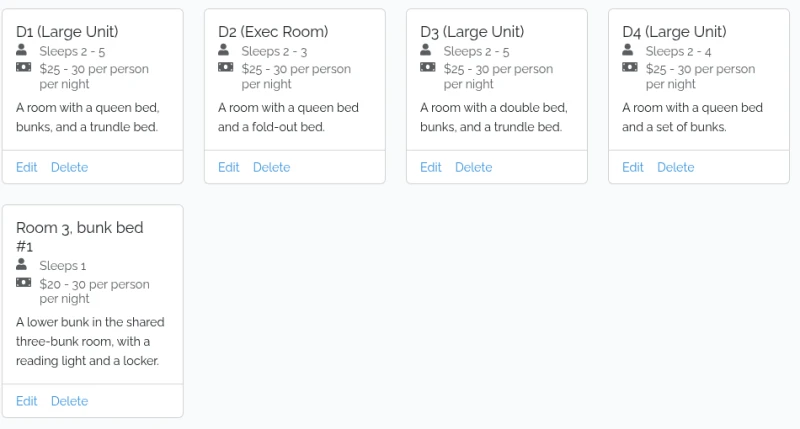
Existing accommodation shows as cards at the top of the page. The Add Accommodation form is underneath them.
Step 2 — Name it
The name has to be unique within your club, and it's limited to 30 characters. Something specific like Room 3, bunk bed #1 beats Bunk, because it's what the guest sees in their confirmation email and what you'll be reading off the bookings list.
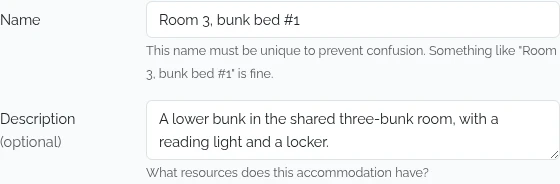
Step 3 — Describe it (optional)
Use the description for what's actually in the room — "a queen bed, bunks, and a trundle bed". It shows on the card and on the booking page. Keep it to 250 characters — unlike the name box, this one doesn't stop you typing past the limit, it just refuses to save.
Step 4 — Set the people and the prices
People per booking is the minimum and maximum the space sleeps; it's shown to guests as "Sleeps 2 - 5", or just "Sleeps 2" when the two match. The maximum can't be lower than the minimum.
Cost per night takes two numbers, a lowest and a highest — most clubs use the member rate and the non-member rate.
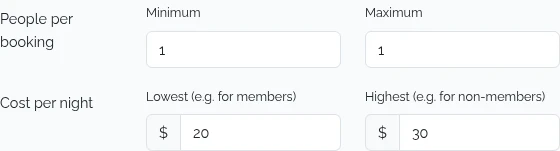
Guests see the two as a range — $20 - 30 per person per night. Put the same figure in both boxes if your club charges one rate, and the card shows a single price; put zero in both — or anything that rounds to zero — and it shows Free. Prices are rounded to whole dollars on the card, so $22.50 displays as $23.
Neither figure is charged or collected by gliding.net.nz — they're there so guests know what to pay your club.
Step 5 — Add it
Click Add Accommodation. The page reloads and the new card appears with the others.
If it won't save
Problems come back on the field they belong to. The usual one is a duplicate name — another room in your club already uses it. Pick a different name and submit again.